Inbox & notifications
The Inbox screen, the per-session status markers ([!] / [?] / [✓]), and the ainb-notifyd daemon are all part of the ainb host binary — not an ainb plugin. This page is the single reference for how notifications work: the daemon captures Claude Code / Codex / Copilot lifecycle hook events into SQLite, and ainb-tui renders them two ways — the Inbox screen (full history) and a live per-session marker (the one row glyph that tells you a session needs you).
Agent support. Claude Code is the primary, most-tested path (registered through the
claudeplugin CLI). Codex is wired via~/.codex/hooks.json; Copilot is wired via~/.copilot/hooks/ainb.json. Their user-facing events flow into the Inbox and mark matching sessions ([✓]/[?]/[!]), though Claude remains the better-exercised integration.
Why it’s not a plugin. The crate is named
ainb-plugin-notifyd(it lives alongside the example plugin crates), but it has nomanifest.toml, no JSON-RPC boundary, and is never spawned as a subprocess.ainb-corelinks it as an ordinary Rust path-dependency and compiles it straight into the host. Contrast with the real v2 subprocess plugins —burndown,session-reader,witr— which run as spawned child processes over stdio JSON-RPC and are governed by the capability gate. The only plugin in this feature isainb-hooks, and that is a plugin of the host agent (Claude Code / Codex / Copilot), installed into their config dirs — not a plugin ofainb.
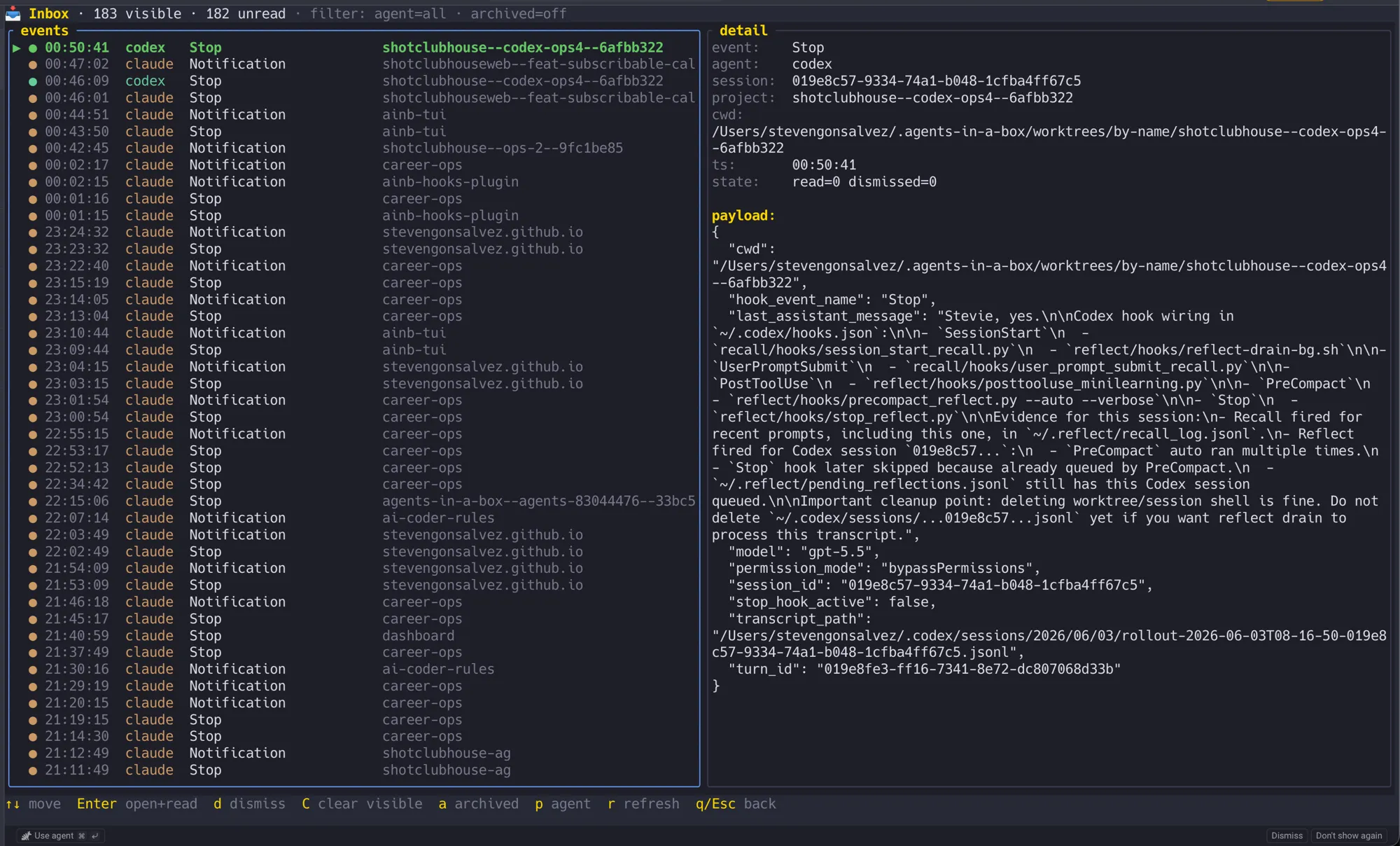
Press b in ainb to open the Inbox — captured Claude Code / Codex / Copilot lifecycle events with a list + detail pane, agent filter, and per-session unread counts.
How it works
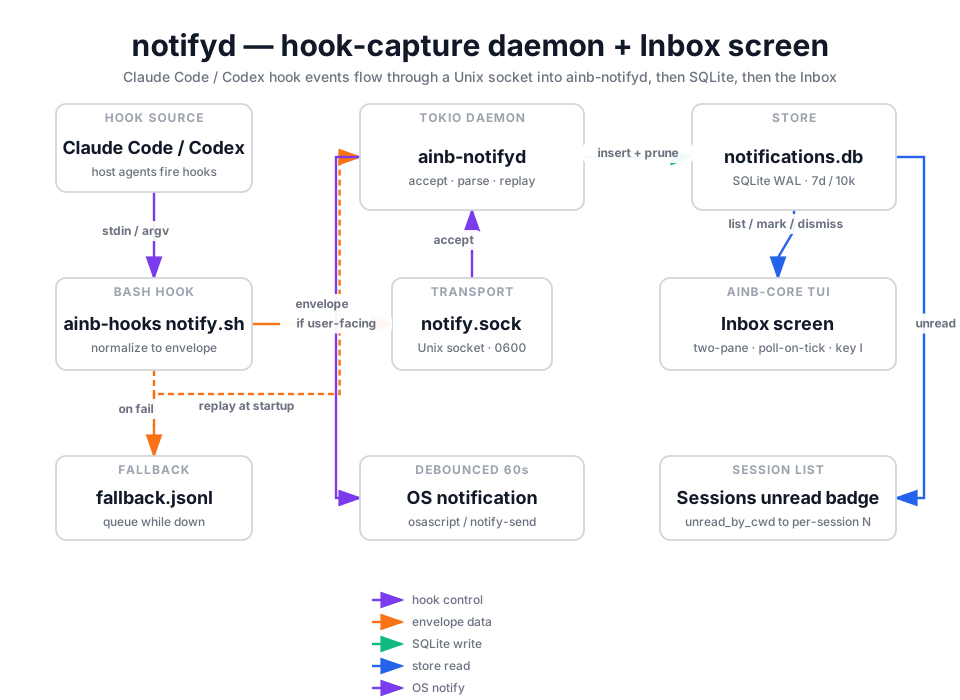
The capture path starts outside ainb, in a thin bash hook (notify.sh). For Claude Code it is registered through the plugin marketplace — ainb notifyd install shells out to claude plugin install ainb-hooks@agents-in-a-box, so Claude resolves and runs the plugin’s bundled notify.sh. For Codex a managed block is merged into ~/.codex/hooks.json pointing at the canonical ~/.agents-in-a-box/hooks/notify.sh. For Copilot, ainb-notifyd writes a standalone drop-in at ~/.copilot/hooks/ainb.json. Only the actionable lifecycle events are registered — Claude uses Notification (idle / awaiting-input + permission prompts), Codex uses PermissionRequest (approval prompts), Copilot uses notification, and all three have a turn-finished hook (Stop / agentStop). When one fires, the script normalizes the payload into a JSON Envelope (protocol_version, agent, raw_event, session_id, cwd, project, ts, payload) and writes one newline-terminated line to the Unix socket at ~/.agents-in-a-box/notify.sock. If the socket is absent it lazy-spawns the daemon; if delivery still fails it appends the envelope to notify.fallback.jsonl. The hook always exits 0 so a delivery failure never blocks the agent.
Telemetry events (SessionStart, UserPromptSubmit, PreToolUse, PostToolUse, PreCompact, PostCompact, SubagentStart, SubagentStop) are deliberately not hooked — PostToolUse alone fires dozens of times per turn and would bury the signal. So the inbox only ever contains things that need you.
ainb-notifyd is a tokio accept-loop daemon. On startup it replays (and clears) any queued notify.fallback.jsonl, then binds the 0600 socket and writes a PID file. Each accepted connection is parsed into an Envelope and checked against is_user_facing: non-actionable events (telemetry like SessionStart / PostToolUse) are dropped before persistence — a defensive second filter on top of the trimmed hook registration, so a stale install never accumulates noise either. User-facing events (Stop, Notification, PermissionRequest, agent-turn-complete, approval/wait events, etc.) are persisted via insert_and_prune and emitted as a native OS notification, debounced per (session_id, raw_event) on a 60s window.
Storage is a dedicated SQLite database, ~/.agents-in-a-box/notifications.db, opened in WAL mode so the daemon (writer) and TUI (reader) never block each other. It is intentionally separate from session-reader’s usage.db — different lifecycles, independent migrations. A retention sweep runs on every insert (default: prune rows older than 7 days, cap the table at 10,000 rows, oldest first).
The render side lives in ainb-core. The Inbox screen (components/inbox.rs) holds a long-lived Store handle and re-queries SQLite on every render tick (cheap with WAL + LIMIT 200). It paints a two-pane list + detail view, and supports mark-read, dismiss, dismiss-all-visible, an archived toggle, and an agent filter. Separately, the Sessions screen reads recent store events to draw a live per-session status marker ([!] / [?] / [✓]) on each session row — see Per-session status markers below. Because notifyd is in-tree, it reaches the filesystem, the socket, and the OS notifier directly — there is no JSON-RPC boundary, no plugin/render / plugin/cli_dispatch, and no host/snapshot/publish.
Per-session status markers
The Inbox is the full history; the status marker is the at-a-glance signal. Every session row in the Sessions screen shows one marker (or nothing), recomputed from the same hook events so you can see across the whole fleet which sessions need you without opening the Inbox. It is sparse by design — a session with no pending event shows nothing.
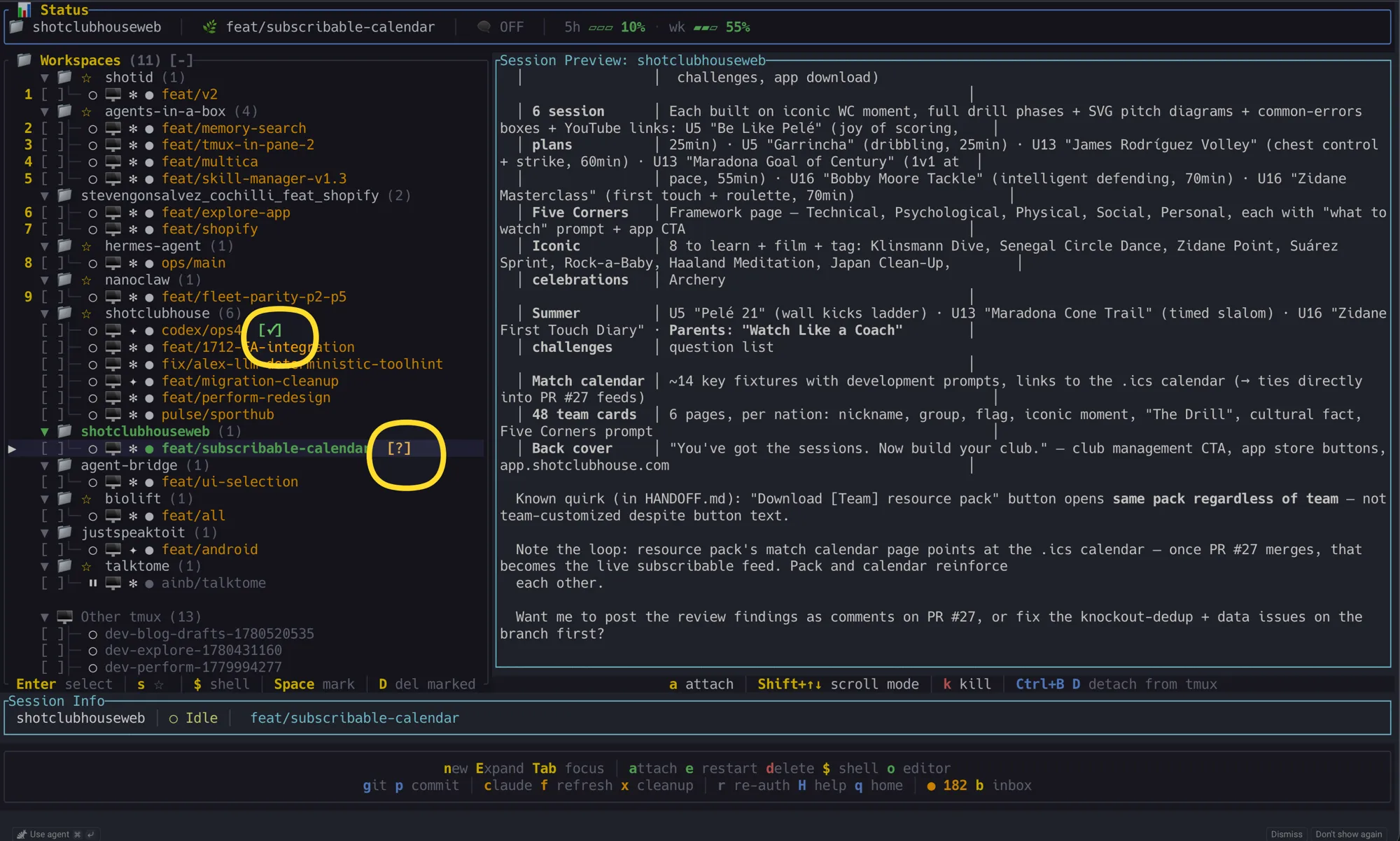
Live markers: a Codex session that just finished its turn shows [✓]; a Claude session awaiting input shows [?]. Idle sessions with nothing pending stay blank.
The agents register the same intent, but not the same raw hook names. The mapping:
Claude Code
| Hook fired | Marker | Means | Shows until |
|---|---|---|---|
Notification | [?] amber | awaiting input — asked a question, needs permission, or the prompt sat idle (~60s) | the agent resumes generating · you attach · a newer Stop supersedes it — no TTL |
Stop | [✓] green | turn finished — over to you | 5-minute TTL · the agent resumes · you attach · a newer event |
PermissionRequest | [!] red | blocked on tool approval | the agent resumes · attach. Fires only on sessions with the fleet plumbing hook set installed (fleet-managed sessions register PermissionRequest there); the plain notifyd install folds permission into Notification, which reads as [?]. On fleet sessions this hook also blocks for a live approve/deny — see Permission approve/deny round-trip |
SessionStart · UserPromptSubmit · PostToolUse · PreCompact | (none) | telemetry — not hooked by the notifyd install (fleet plumbing registers SessionStart/UserPromptSubmit to drive the fleet panel’s STARTING/RUNNING states) | — |
Codex
| Hook fired | Marker | Means | Shows until |
|---|---|---|---|
(none — Codex has no Notification hook) | [?] amber | awaiting input | not shown today — Codex permission prompts use PermissionRequest; turn completion uses Stop |
Stop (aliases agent-turn-complete, task_complete) | [✓] green | turn finished | 5-minute TTL · resumes · attach |
PermissionRequest | [!] red | blocked on exec/patch approval | clears when the agent resumes · attach |
SessionStart · UserPromptSubmit · PreToolUse · PostToolUse · PreCompact · PostCompact · SubagentStart · SubagentStop | (none) | telemetry — not hooked | — |
GitHub Copilot CLI
| Hook fired | Marker | Means | Shows until |
|---|---|---|---|
notification | [?] amber | awaiting input or permission prompt | the agent resumes · you attach · a newer agentStop supersedes it — no TTL |
agentStop | [✓] green | turn finished | 5-minute TTL · resumes · attach |
While a session is actively generating, the marker is suppressed (the busy state covers it). The marker recomputes every ~5 s (the preview-refresh tick), so every appear/clear lands on that cadence rather than instantly.
Does it clear when I answer? Yes — answering a session (typing a prompt, or approving a permission) makes the agent start responding, and the marker clears on the next ~5 s refresh once it does. It clears via the agent resuming, not the keystroke itself, so there’s a ≤5 s window between hitting enter and the marker disappearing. Attaching to a session clears it immediately and advances a per-session baseline to “now”, so it won’t re-mark until new activity arrives after you look away.
Markers are matched to sessions by working directory + agent: each hook event carries the cwd it fired in, joined to the ainb session whose workspace_path matches (trailing-slash tolerant). Only events within a rolling 6-hour window count — so opening ainb immediately surfaces sessions that were already waiting before you launched it (the [✓] TTL keeps long-finished turns from piling up, so only genuinely-pending [?] / [!] survive).
Permission approve/deny round-trip
Fleet-managed Claude sessions get a synchronous, first-class permission gate: when Claude fires a PermissionRequest hook, the hook process blocks on notifyd’s approve socket until a human approves or denies it — from the fleet panel, the CLI, or not at all (timeout ⇒ deny). The answer flows straight back to Claude as the hook’s hookSpecificOutput permission decision, so approving in the TUI is exactly as authoritative as pressing y in the Claude session itself.
┌────────┐ PermissionRequest ┌───────────┐ AWAIT ┌────────────────┐│ Claude │──────────────────▶│ hook proc │─────────▶│ approve.sock ││ session│ │ (blocks) │ │ (notifyd) │└────────┘ └───────────┘ └────────────────┘ ▲ │ ▲ │ hookSpecificOutput │ decision │ DECIDE │ allow / deny ▼ │ └─────────────────────────────┘ ┌──────────┴───────┐ │ fleet panel y/n │ │ ainb fleet │ │ approve/deny │ └──────────────────┘- Fleet panel (TUI) — press
fon the home screen. A session blocked on approval shows the goldAPRVbadge (a freshly booting one shows blueSTRT); select the row and pressyto approve ornto deny. - CLI —
ainb fleet approvewith no argument lists the sessions currently waiting (with tool, context, and wait time;--format jsonfor scripting).ainb fleet approve <session-id>/ainb fleet deny <session-id> [--reason "…"]delivers the decision; a no-waiter miss exits non-zero.
Fault tolerance — no hook is ever lost
The waiting side is built to survive every failure mode without silently green-lighting a tool call:
- Timeout ladder — the broker holds an AWAIT for up to 600 s; the waiting hook re-dials until 640 s; Claude’s own hook timeout is registered at 660 s. Each layer answers before the one above kills it, and an unanswered wait falls back to deny — never auto-approve.
- Dead or restarted socket — the blocked hook re-dials
approve.sockevery 500 ms until its deadline. If notifyd dies mid-wait, the prompt isn’t lost: the moment a fresh daemon binds the socket, every still-waiting hook re-registers itself. - Single resume/repair command —
ainb notifyd restart(CLI) orRin the Daemons overlay stops the owner, reaps strays, respawns, and waits forapprove.sockto bind. Because of the re-dial loop, that one command repairs the socket and resumes every pending prompt. - Observability — the approve broker is a first-class row in
ainb fleet daemons, with the live pending-waiter count in its health reason (serving — 2 pending requests), and notifyd’s processes are listed in thedoverlay.
Host resources it touches
Because this is host code, there is no manifest and no capability declaration — the capability gate that governs subprocess plugins does not apply. It reaches the filesystem, the socket, and the OS notifier directly. For reference, the host-side resources it touches are:
| Resource | Why it is needed |
|---|---|
~/.agents-in-a-box/notifications.db (SQLite, read+write) | Persist captured envelopes; back the Inbox list and the unread badge. |
~/.agents-in-a-box/notify.sock (Unix socket, 0600) | Receive envelopes from the ainb-hooks script. |
~/.agents-in-a-box/notify.pid, notify.fallback.jsonl | Single-instance guard; recover events queued while the daemon was down. |
~/.agents-in-a-box/approve.sock (Unix socket, 0600) | The approve broker — blocked PermissionRequest hooks park here awaiting a human approve/deny from the fleet panel or CLI. Rides notifyd’s process; visible as its own row in ainb fleet daemons. |
claude CLI (subprocess), ~/.codex/hooks.json (read+write), ~/.copilot/hooks/ainb.json, ~/.agents-in-a-box/hooks/notify.sh | The install / uninstall verbs wire the hook into the host agents — Claude via claude plugin install/uninstall, Codex via a managed hooks.json block, Copilot via a standalone drop-in. |
osascript / notify-send (subprocess) | Emit the native OS notification for user-facing events. |
Using it
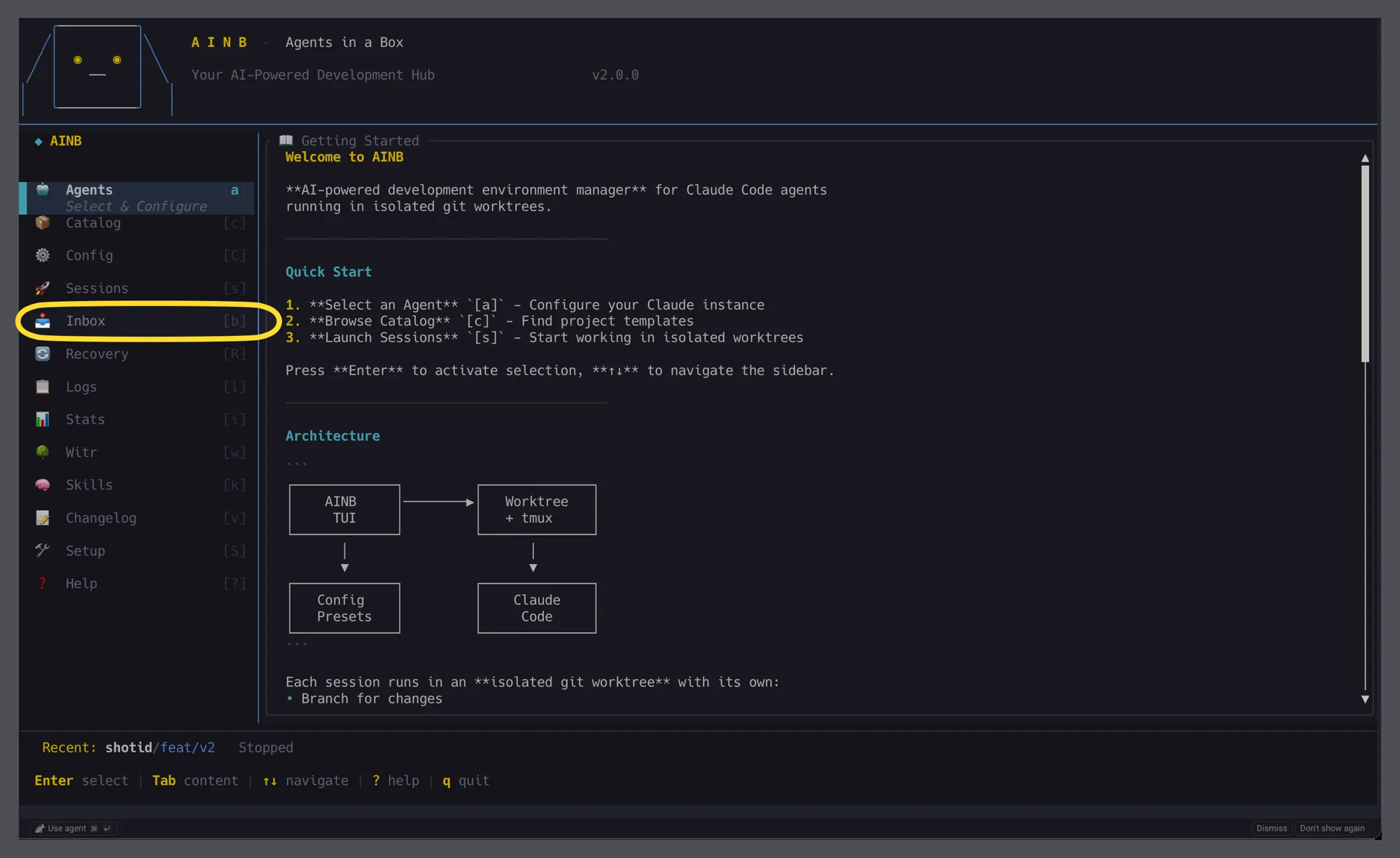
The Inbox is a first-class home-screen surface — b from anywhere, or Enter on the sidebar tile.
- Discoverability surfaces — three places advertise the Inbox so users don’t have to memorise a hidden shortcut:
- The home screen sidebar lists
📥 Inbox [b]between Sessions and Recovery — pressEnteron the tile, orbglobally, to open it. (bfor “in-Box” — picked to avoid the case-pair confusion betweeniStats and the earlierIInbox binding.) - The bottom menu bar (every split-pane screen) always shows
b inbox. When the store has unread + non-dismissed events the hint becomes● N · b inbox, so the global unread count is visible even when the Inbox screen is closed. - The Sessions screen renders a live status marker (
[!]/[?]/[✓]) on the row of any session with a pending hook event, matched bycwd↔workspace_path. This is the primary surface — notifications are tied to the session that produced them, not a separate destination. See Per-session status markers.
- The home screen sidebar lists
- Inbox screen — press
bfrom anywhere on the home screen, orEnteron the📥 Inboxsidebar tile. You get a two-pane list + detail view of captured events. Keys inside the Inbox:↑/↓(ork/j) move,PageUp/PageDownjump 10 rows,Enteropen + mark read and jump to the matching session’s tmux pane (via the cwd correlation below),ddismiss selected,Shift+Cdismiss every visible row,atoggle archived (dismissed) rows,pcycle the agent filter (all → claude → codex → copilot),rforce refresh,q/Escback. - cwd-based correlation (jump-to-tmux) — every envelope carries the agent’s
cwdat hook-fire time, and every ainbSessioncarries aworkspace_path. When the user pressesEnteron an Inbox row, notifyd resolves the row’scwdto the first ainb workspace whose path matches (exact orworkspace_path/-prefix to cover worktree subdirs), picks a session in that workspace, and queues anAttachToOtherTmuxaction with that session’stmux_session_name. There is no shared session-id namespace between the host agents’session_idstrings and ainb’sSession.idUuid; the cwd is the bridge. - Daemon + installer CLI — the verbs live both on the standalone
ainb-notifydbinary and as theainb notifyd …subcommand on the mainainbbinary (both delegate to the identicalainb_plugin_notifydfunctions, so they can never diverge). The alias exists becausenotify.sh’s lazy-spawn invokesainb notifyd— the host binary is the one guaranteed to be onPATHafter a normal install. Verbs (both forms work):ainb-notifyd run(orainb notifyd run/ bareainb notifyd) — run the daemon in the foreground. The hook script lazy-spawnsainb notifydwhen the socket is missing; ifainbis onPATHthe daemon auto-starts and the event is delivered live (no fallback file).ainb-notifyd install --claude --codex --copilot(or--all) — install theainb-hookshook for the chosen agents.ainb-notifyd uninstall --claude --codex --copilot(or--all) — reverse the install; preserves user-authored Codex hooks and other Copilot hook files.ainb-notifyd status— report per-agent install state, hook-script health, socket liveness, last event, and daemon PID liveness.--format jsonemits{agents, daemon: {pid, running}}for scripting.ainb-notifyd stop— sendSIGTERMto a running daemon via its PID file.ainb-notifyd restart— stop the owner, reap strays, respawn, and wait for the approve socket to bind: the single resume/repair command for a dead or wedged approve socket (see the round-trip section for why waiting prompts survive it).ainb-notifyd reap— kill orphaned/wedged notifyd strays, sparing the live owner.- Every verb accepts
--format(defaulttext) for scripting — e.g.ainb notifyd status --format json. The host form takestext|json|csv|markdown; the standaloneainb-notifydbinary takestext|json.
- Snapshot topics — none.
notifyddoes not publish or subscribe on the event bus; the Inbox reads SQLite directly. There is no slash command.
Source
crates/ainb-plugin-notifyd — in-tree library + ainb-notifyd daemon binary: envelope wire format, the SQLite Store (recent_since backs the markers), event→marker classification (classify_attention), the tokio listener, OS-notify dispatch, and the ainb-hooks install/uninstall logic (Claude via the claude CLI). The Inbox screen lives in crates/ainb-core/src/components/inbox.rs; the per-session marker logic (attention_for_session / refresh_attention_markers) lives in crates/ainb-core/src/app/state.rs. Diagram generated via /fireworks-tech-graph.