learnings plugin
learnings is the in-tree memory browser plugin: it is the read-only TUI window onto the knowledge base that the reflect plugin captures and indexes. Where reflect is the write side — it watches your Claude Code sessions, captures corrections as learning notes, and dual-indexes them — learnings is the read side: a Browse / Search / Graph explorer over that same ~/.learnings store, with no data plane of its own. Open it in ainb with m, or from any agent with the /recall / /memory slash commands.
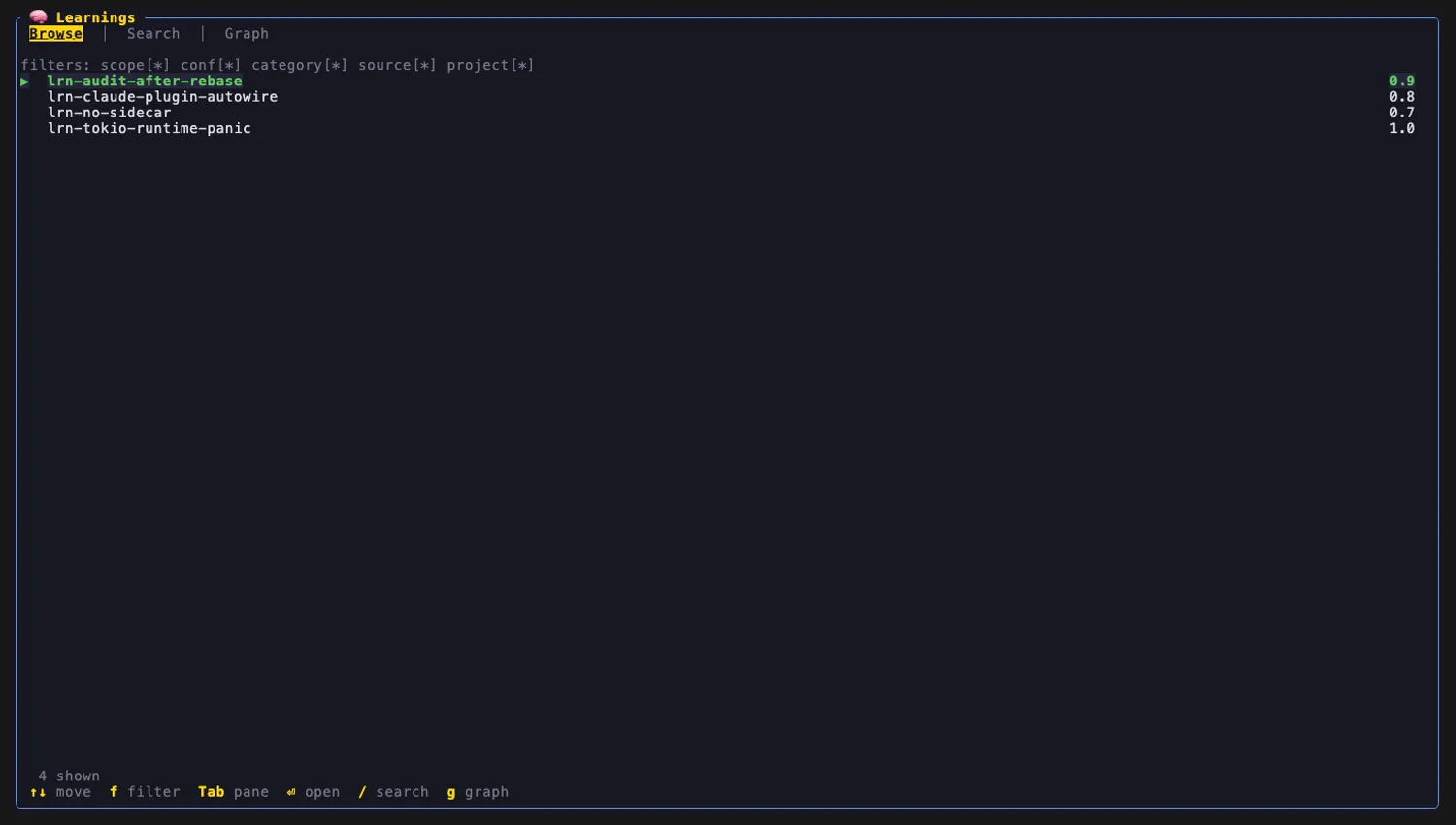
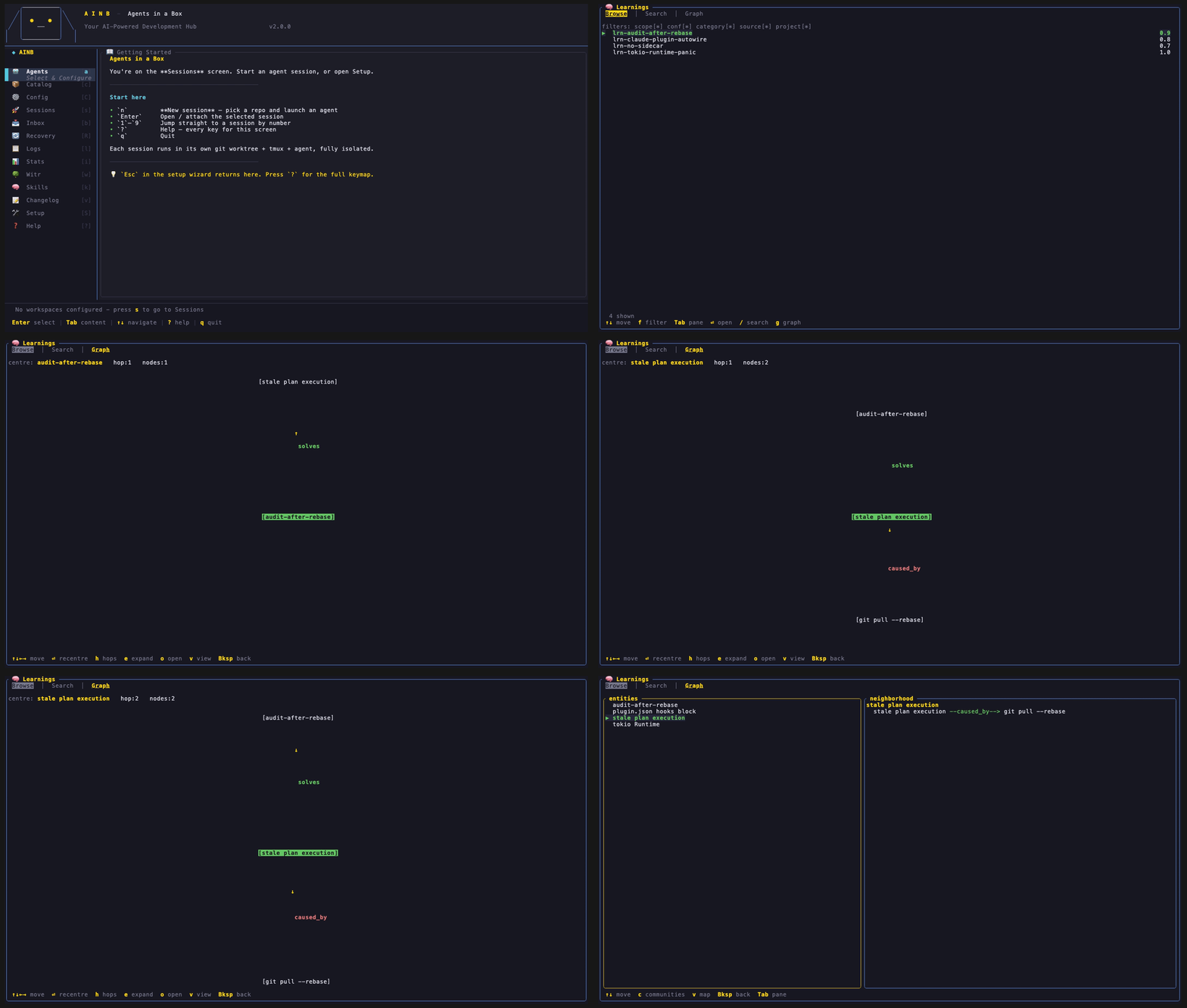
Press m in ainb to open the learnings screen. Browse lists every note in the KB with its confidence; f cycles the filter chips, Tab///g switch panes.
What it is a view of
learnings is, in the words of its own manifest, “a read-only browser over the reflect knowledge base.” It never writes learnings and never re-indexes — it reads the artifacts reflect (and the reflect-kb CLI) produce and renders them three ways. It is the natural companion to the reflect plugin and the reflect CLI: reflect’s correct once, never again loop fills the store; learnings lets you actually see what’s in it.
The memory file system it reads
The knowledge base is a plain directory tree — the canonical root is ~/.learnings/ (the legacy ~/.claude/global-learnings/ root is still read as a fallback). learnings reads three kinds of artifact directly off disk, plus one through a CLI:
| Artifact | Path (default) | What learnings does with it |
|---|---|---|
| Markdown learning notes | ~/.learnings/documents/learnings/*.md | The Browse list + the Detail read-pane. Each note carries YAML front-matter (title, category, scope, confidence, key_insight, tags, provenance) and a Markdown body. |
| Entity sidecars | *.entities.yaml next to each note | The typed graph. Each sidecar declares entities (name / type / description) and relationships (source, target, type ∈ solves / caused_by / causes / requires / relates_to, strength). These typed edges are what the Graph tab draws. |
| nano-graphrag cache | ~/.learnings/nano_graphrag_cache/ | graph_chunk_entity_relation.graphml (the GraphRAG entity graph) and kv_store_community_reports.json (the community clusters) — the source for the community-cluster view. |
| QMD index | ~/.cache/qmd/index.sqlite, collection learnings | The Search tab. learnings shells the qmd binary against this index for fast lexical/semantic recall — it does not parse the sqlite itself. |
Compatibility, in one line: if
reflect(orreflect reindex) built it,learningscan view it. The plugin reads the exact layout the reflect plugin’srecall.py/ synthesis scripts and thereflect-kbCLI write — Markdown notes +.entities.yamlsidecars + the nano-graphrag graphml/community cache + the qmd index. Becausereflect:ingestharvests memory from every agent (Claude, Codex, Copilot, Gemini) into that one unified store,learningsends up being a single pane over all of them.
How it lines up with reflect
reflect plugin (Claude Code) learnings plugin (ainb TUI) ─────────────────────────── ─────────────────────────── SessionStart / Stop / PreCompact capture corrections ─┐ /reflect classify + write │ writes ┌─ Browse (notes + filters) note.md + entities.yaml ├─▶ ~/.learnings ─┼─ Search (qmd recall) reflect:ingest harvest │ (+ qmd + └─ Graph (entity graph) Claude/Codex/Copilot/… ──┘ graphrag) ▲ read-only, no re-indexReflect owns capture + indexing (and auto-recall back into the agent’s context). learnings is the human-facing viewer of the same files — so the two share a store but never a write path. Set up reflect first (ainb reflect bootstrap); learnings then has something to show.
The three views
learnings is a tabbed shell — Tab cycles Browse → Search → Graph, and g jumps straight to the Graph tab from anywhere.
Browse — the notes
The Browse tab (above) lists every note by id with its confidence, and a row of filter chips (scope / conf / category / source / project). f activates the chips, ↑↓ move, ⏎ opens the Detail read-pane (title, key insight, the Markdown body, the entity + relationship lists, and provenance), Backspace closes it.
Search — qmd recall
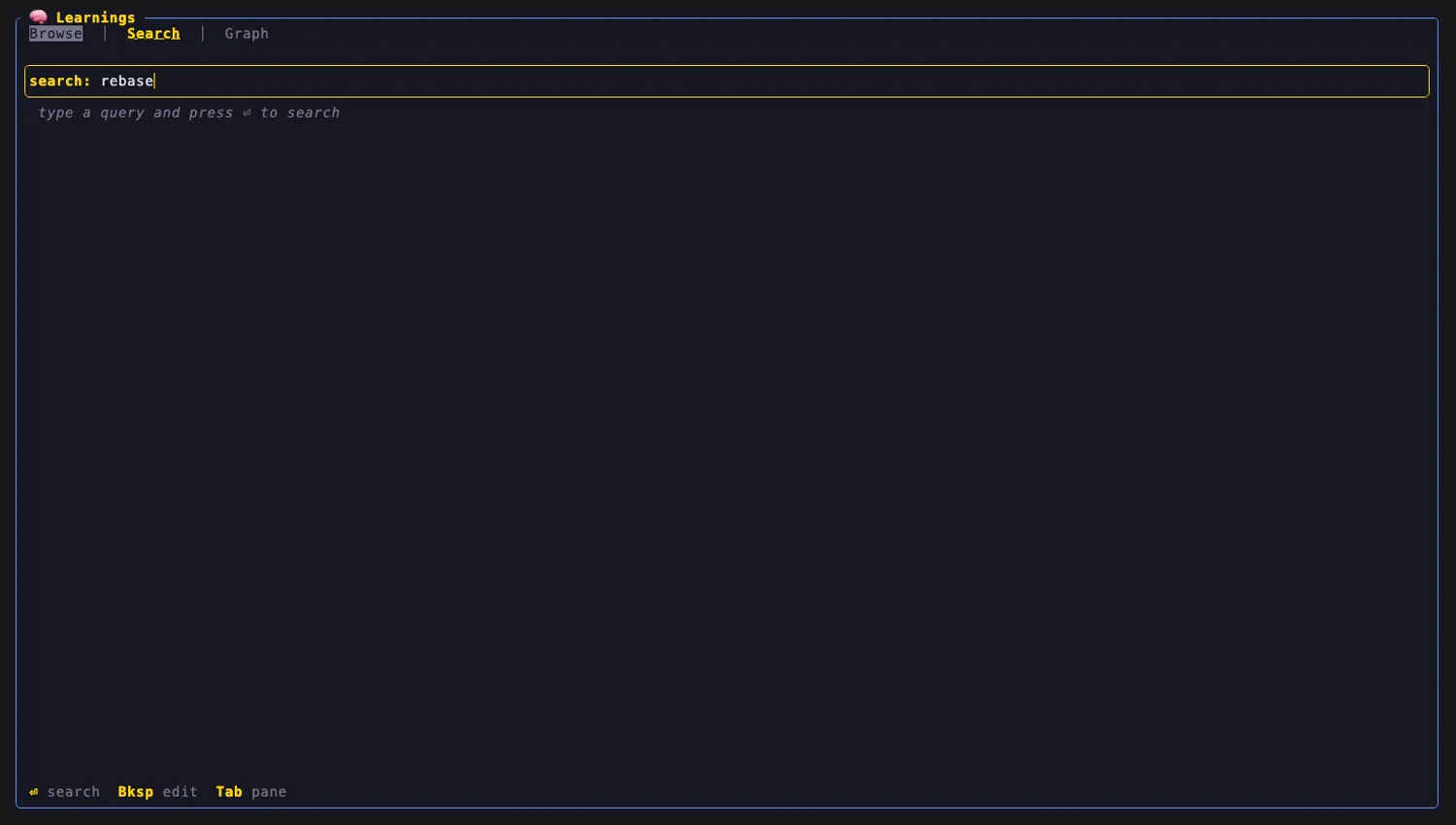
/ (from any tab) focuses the Search query box; type a query and ⏎ runs a hybrid lexical/semantic search against the qmd index, listing ranked hits you can open into Detail. This is the same recall surface the reflect hooks use automatically at session start — here you drive it by hand.
Graph — see how memories connect
The Graph tab is where the typed entities.yaml relationships come alive. g focuses it; it has three renderings.
What graphs can the plugin render?
Three, each a different lens on the same typed entity graph:
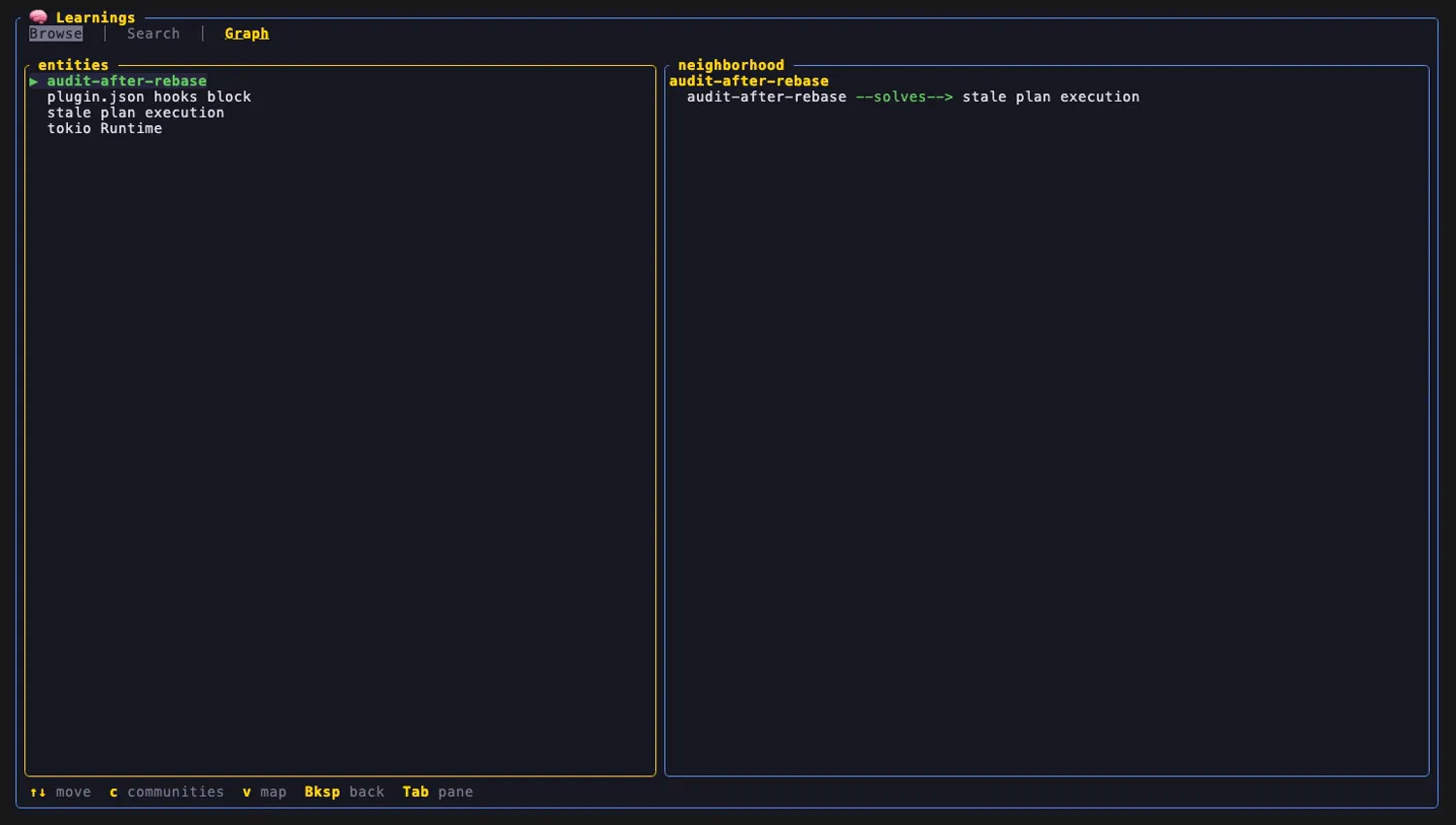
1 · Entity neighbourhood (text) — the default. Pick an entity from the list and see its typed outgoing edges as <entity> --<rel_type>--> <neighbour> lines, aggregated across every note’s relationships[].
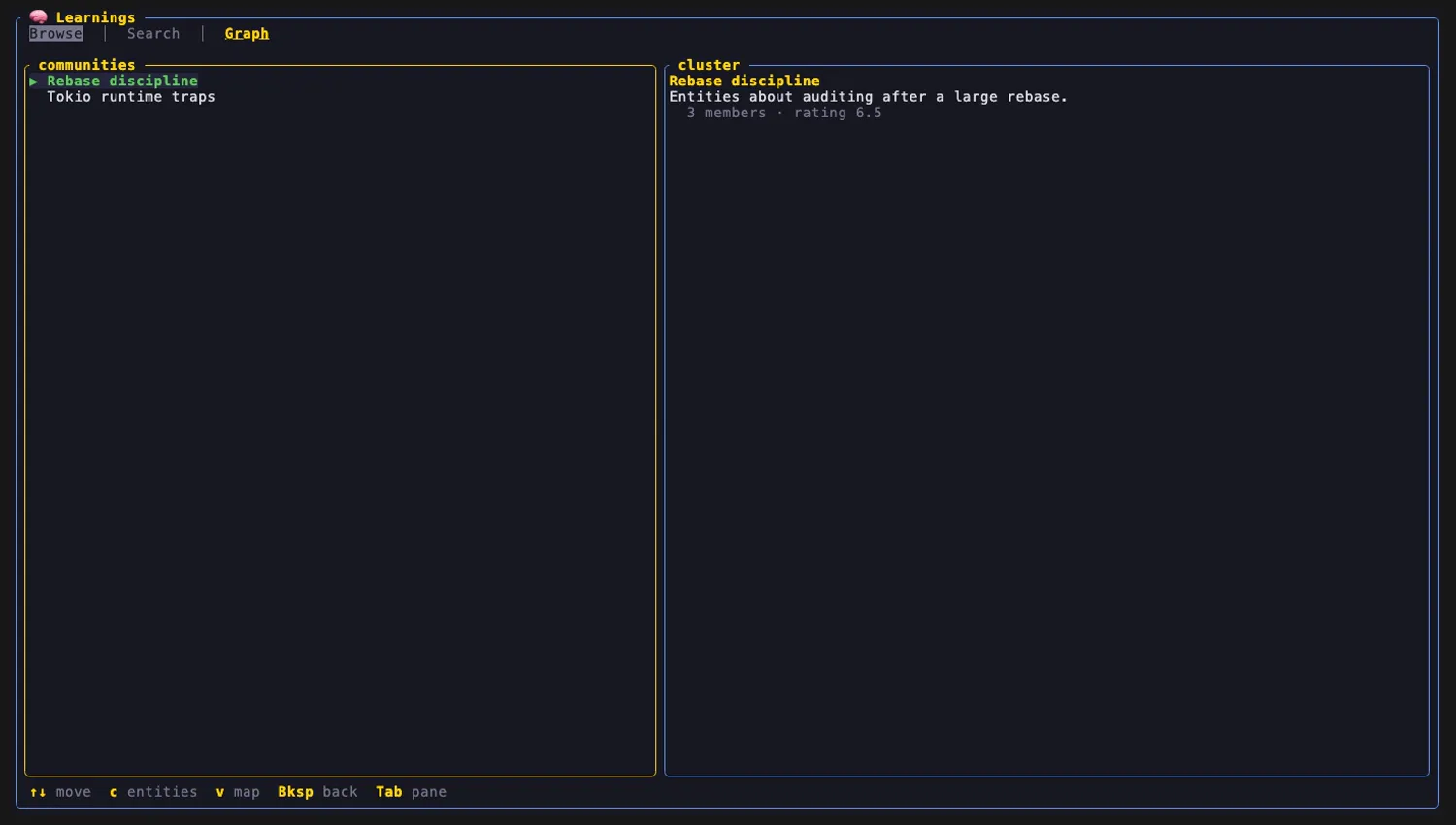
2 · Community clusters — press c to toggle to the nano-graphrag community view: one row per detected cluster (title + member count + impact rating), read from kv_store_community_reports.json. This is the GraphRAG “communities” lens — groups of entities that co-occur across many learnings.
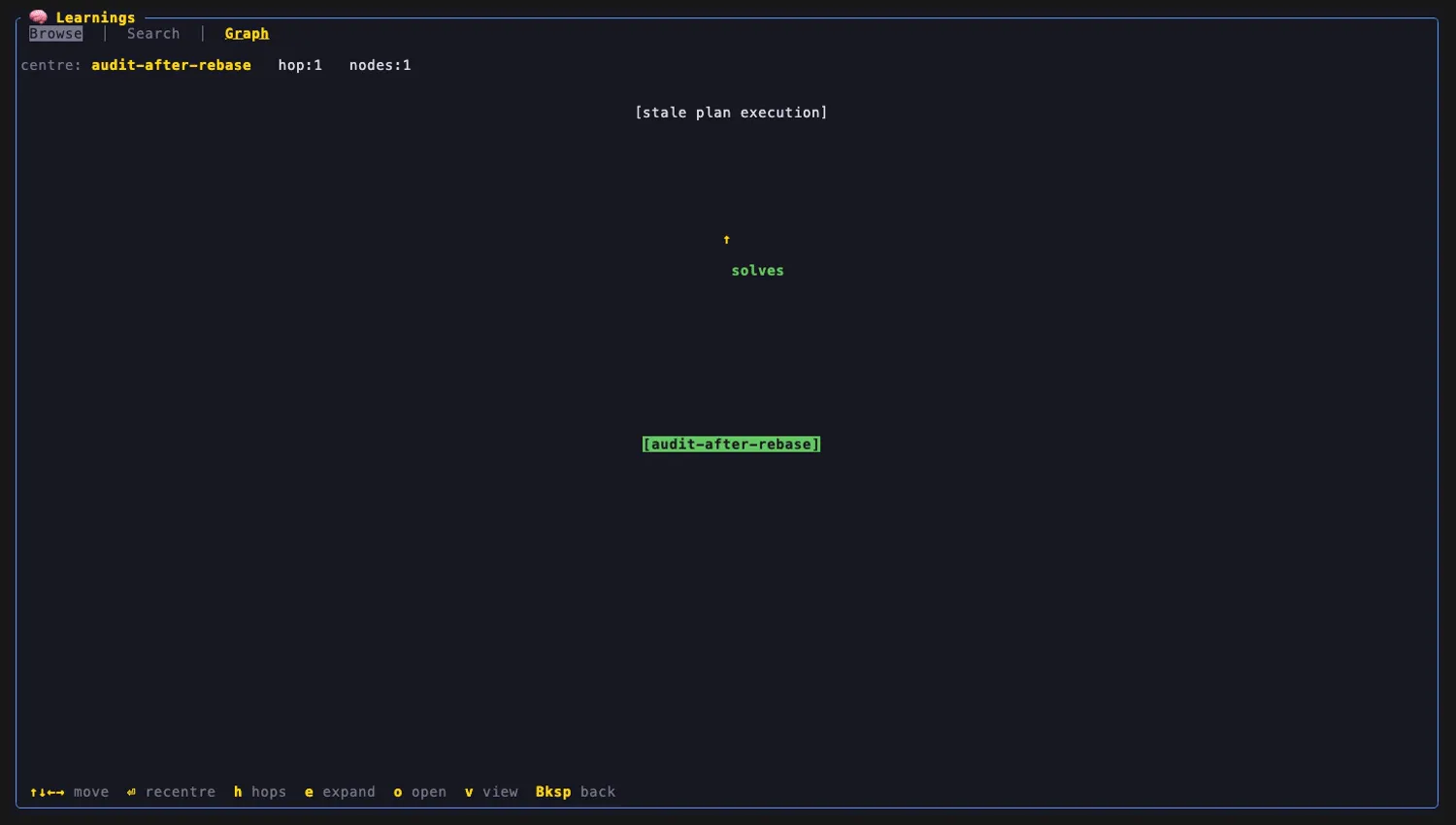
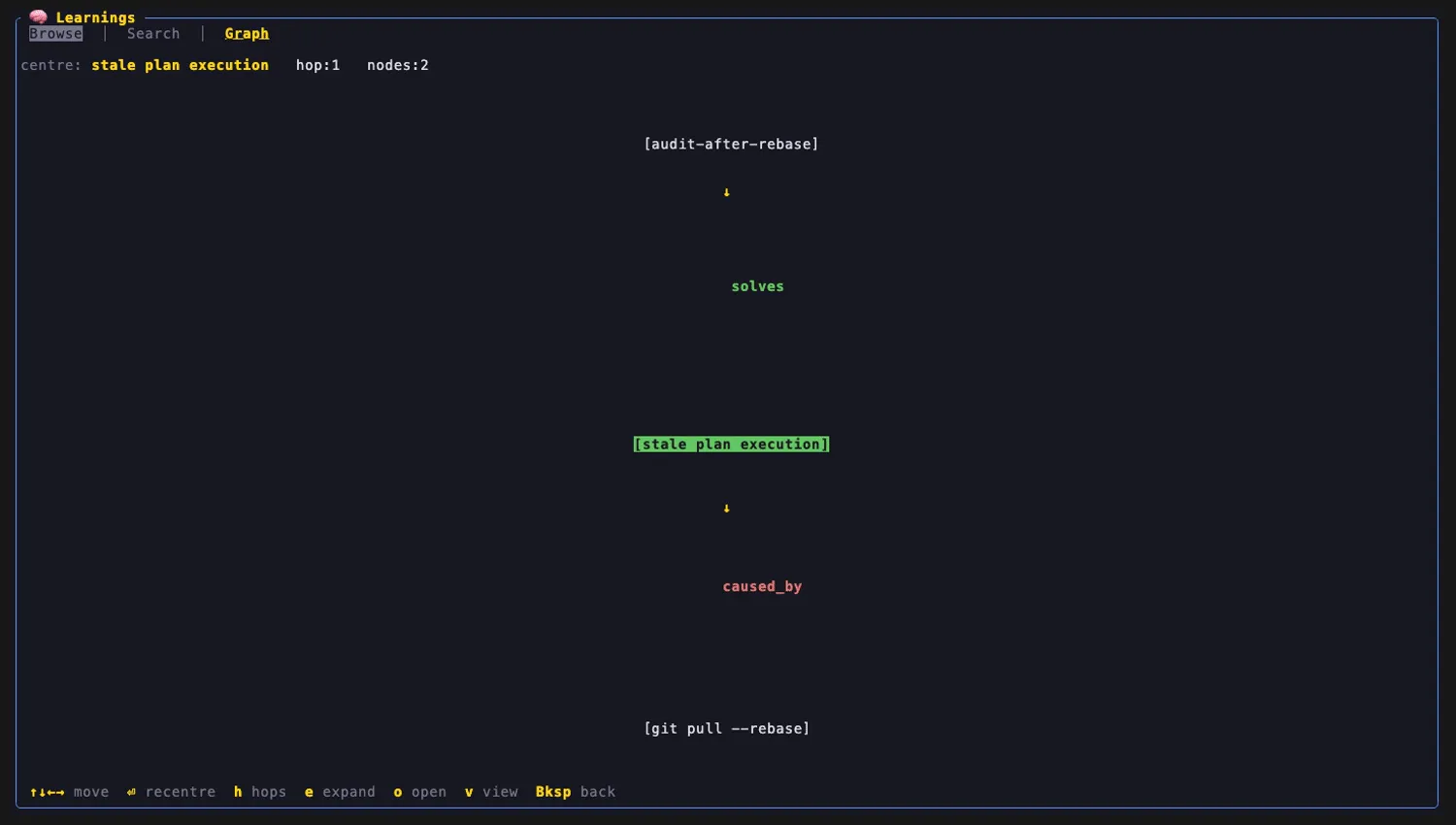
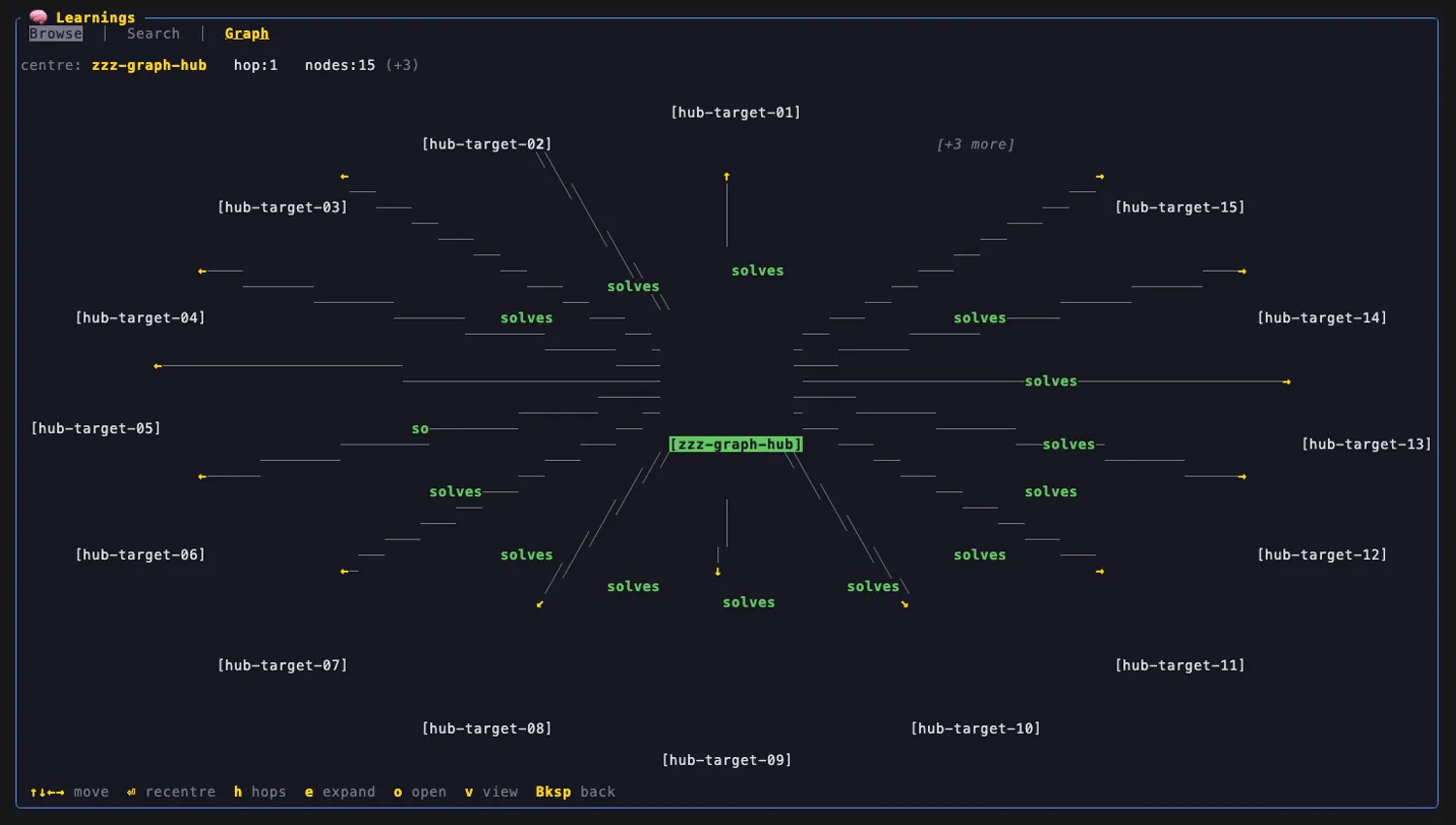
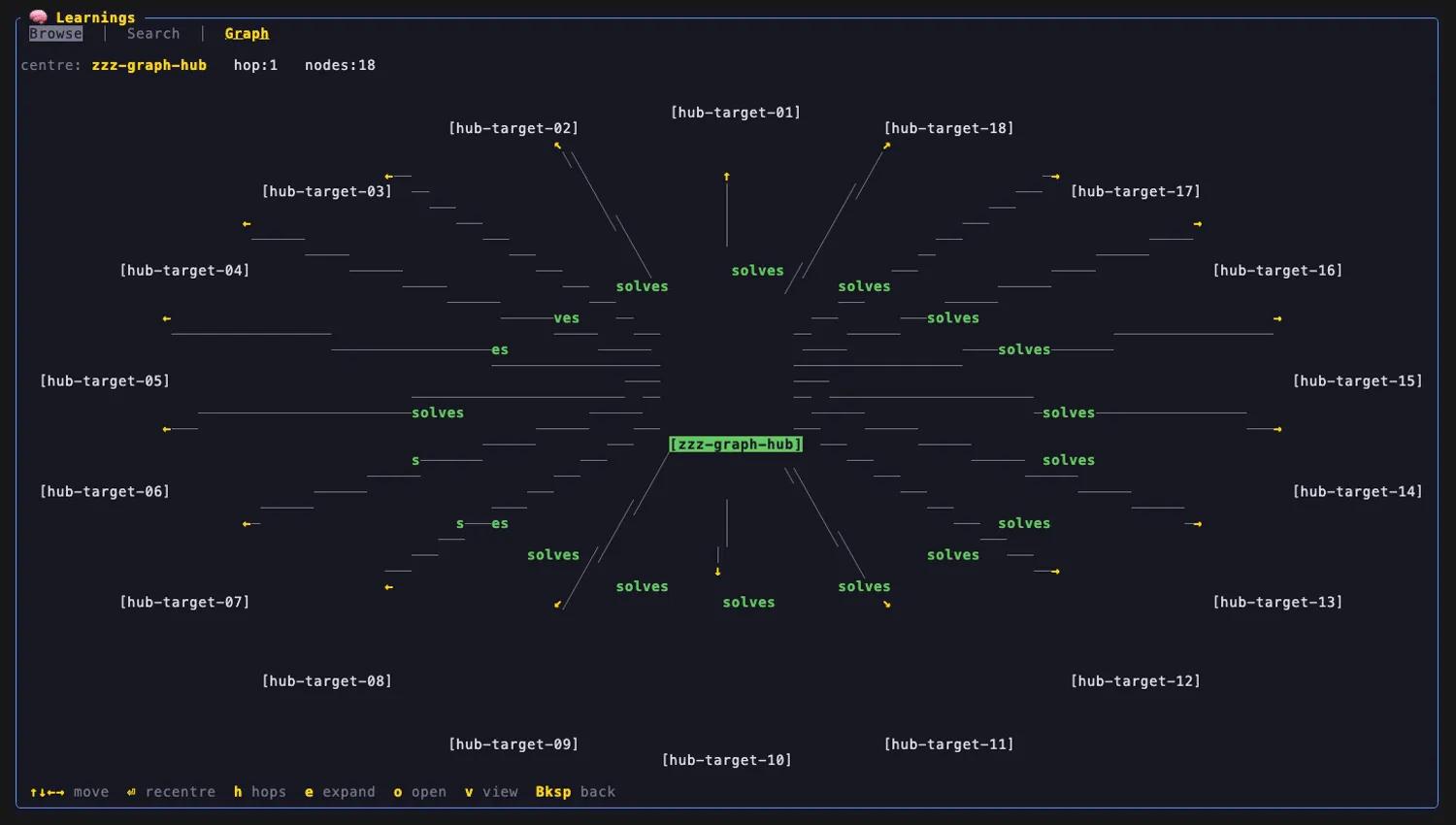
3 · Radial ego local-graph (the map) — press v to swap the text neighbourhood for a spatial, Obsidian-style local graph drawn on the character grid. The list-selected entity sits at the centre; its typed neighbours fan out on a ring as boxed [entity] nodes, joined by ASCII edges with arrowheads on directed relationships and colour-coded type labels (solves green, caused_by/causes red, requires blue, relates_to grey with no arrowhead). It is fully deterministic — no physics, no random layout — so the same KB always draws the same map.
m → g → v opens the radial map; ↓+⏎ recentres on a neighbour; h widens the hop; Backspace returns to the neighbourhood.
The map is an ego / local graph: centre + 1 hop by default (toggle to 2 with h), capped at 15 nodes with the remainder folded into a single [+N more] node that e expands. Recentring (⏎ or a mouse click on a node) animates the new neighbourhood outward and changes the centre:
| Centred on one entity | After ⏎ recentre on a neighbour |
|---|---|
 |  |
For a hot, highly-connected entity the 15-node cap keeps the ring legible and offers [+N more]; e expands it to the full set:
Capped: nodes:15 (+3) | Expanded with e: nodes:18 |
|---|---|
 |  |
Not (yet) rendered: a full-graph (whole-KB, non-ego) view and force-directed physics are deliberately out of scope for v1 — the radial ego layout was chosen precisely because it is cheap and deterministic.
Graph keymap
| Key | Action |
|---|---|
g | focus the Graph tab |
↑ ↓ / j k | move the selection (neighbourhood/community lists) |
c | toggle entity neighbourhood ⇄ community clusters |
v | cycle the view: neighbourhood → radial map → neighbourhood |
↑ ↓ ← → (in map) | move across rings (↑↓) / orbit within a ring (←→) |
⏎ / mouse click (in map) | recentre on the selected / clicked node — animated |
h (in map) | toggle hop depth 1 ↔ 2 |
e (in map) | expand the [+N more] overflow node |
o (in map) | open the learnings behind the entity (a picker if more than one → Detail) |
Backspace | exit the map / release graph focus (Esc is host-reserved) |
How it works
learnings is lazy-spawned (manifest [lifecycle].spawn = "lazy") — it stays dormant until you open the screen or type /recall / /memory. On plugin/init the host injects the resolved [plugins.learnings] config; the plugin scans learnings_dir for *.md notes (+ their .entities.yaml sidecars), aggregates every note’s relationships[] into a typed adjacency keyed by entity name, and lazily reads the graph_cache community json the first time you reach the Graph tab. The Graph map is a pure pipeline — extract the ego subgraph → deterministic radial layout → render boxes/edges/arrowheads/labels — so it renders the same tokens every run. Search shells qmd against the configured index; selecting a hit opens the same Detail pane Browse uses.
Capabilities
Declared in manifest.toml [capabilities] (everything not listed defaults to deny):
| Capability | Why it is needed |
|---|---|
read_paths = ["~/.learnings", "~/.cache/qmd"] | Path-scoped fs read envelope — the plugin may read the KB notes/sidecars, the nano-graphrag cache, and the qmd index, and nothing else. |
spawn_subprocess = ["qmd", "learnings"] | Semantic search shells qmd; graph-expanded search may shell learnings. |
write_plugin_data | Persist plugin-local UI state under the plugin data dir. |
event_bus | Exposes the snapshot/event reverse channel for refresh. |
It declares no cli_namespaces — learnings is TUI-only.
Configuration
User-set values live in config.toml [plugins.learnings] and are injected at plugin/init. All four default to the reflect KB’s standard layout, so a default reflect install needs no configuration:
| Key | Default | Meaning |
|---|---|---|
learnings_dir | ~/.learnings/documents/learnings | Where the *.md notes + .entities.yaml sidecars live (Browse + Graph). |
graph_cache | ~/.learnings/nano_graphrag_cache | The nano-graphrag graphml + community json (community view). |
qmd_index | ~/.cache/qmd/index.sqlite | The qmd sqlite index (Search). |
qmd_collection | learnings | The qmd collection name. |
Point these at any directory that follows the same reflect-KB layout to browse a different store.
Using it
- Screen — provides the
learningsscreen. Open it withm(or/recall//memory).Tabcycles Browse → Search → Graph;/jumps to Search;gjumps to the Graph tab. - Slash commands —
/recalland/memoryboth open the learnings screen from any agent context.
Related
- reflect plugin — the capture + indexing side that builds the KB
learningsviews. - reflect CLI (
reflect-kb) — theadd/reindex/searchdata layer. - Plugin architecture overview — how ainb’s v2 subprocess plugins work.