burndown plugin
burndown is the in-tree screen-owner reference plugin: it paints the full Analytics dashboard and owns the ainb usage CLI tree. It is also the consumer half of the event-bus publish/subscribe pattern — it does not scan any session files itself, it renders the snapshots session-reader publishes.
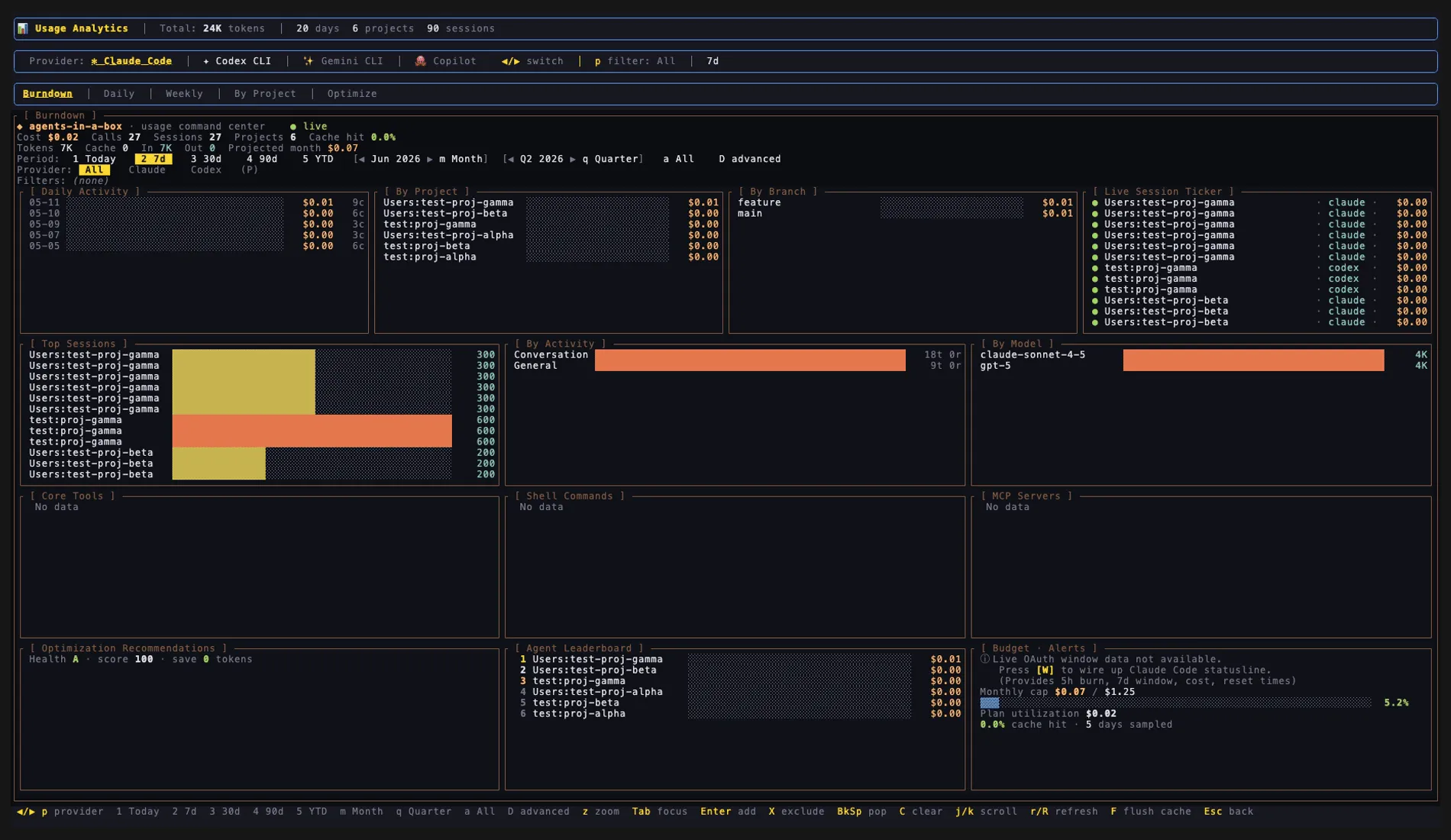
Press i in ainb to open the Analytics dashboard — cost/token burndown, per-project and per-model breakdowns, a live session ticker, and optimization hints.
How it works
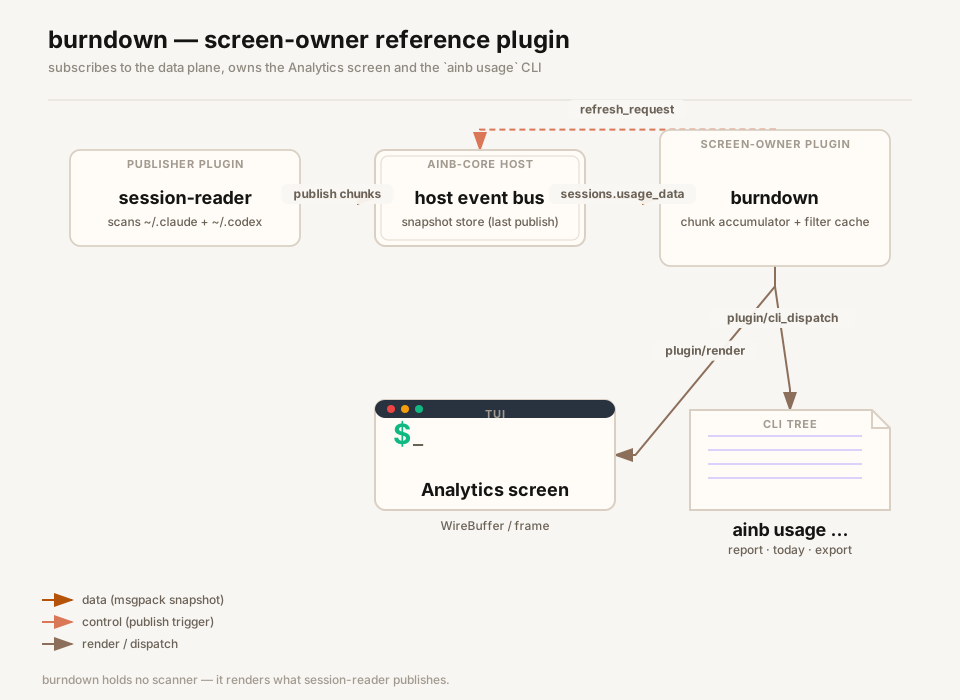
burndown is eager-spawned (manifest [lifecycle].spawn = "eager"). On plugin/init it subscribes to sessions.usage_data and sessions.scan_progress, then publishes an empty payload on sessions.refresh_request to kick session-reader into a fresh scan with the subscription already on the wire — closing the race where chunk 0 of an in-flight publish would otherwise be missed.
session-reader scans ~/.claude/projects/** and ~/.codex/sessions/** and publishes the aggregated usage to the host event bus. The host delivers each publish to burndown as a plugin/handle_event call on the subscribed topic. Large snapshots arrive chunked: chunk 0 carries the bounded aggregates, follow-on chunks extend the calls / sessions / shell_commands tails, and the is_final chunk assembles the accumulator into the live UsageData (a wire-version mismatch latches a schema-upgrade hint instead). Progress ticks on sessions.scan_progress drive the “Scanning sessions… N/M” skeleton until real data lands.
For the Analytics screen, the host sends plugin/render with a Viewport; burndown paints a ratatui Buffer, converts it to a sparse WireBuffer cell stream, and the host blits it each frame. Filtering (analyze_turns + per-day/project/model rollups) is memoised in a one-deep cache keyed on (data_generation, filters+period+provider) so idle re-renders are O(1). Keystrokes arrive via plugin/handle_key — most mutate local UI state (period 1–5/m/q/a, provider ←/→/p, panel focus Tab, zoom z, drill-down Enter); r re-publishes sessions.refresh_request and F publishes sessions.flush_cache_request.
For the CLI, the host routes ainb usage … through plugin/cli_dispatch. burndown strips the host-level --format flag, re-parses the rest with clap, and runs the report against its latest in-memory snapshot — capturing the legacy report writer’s stdout into the JSON-RPC reply. If no snapshot has arrived yet it returns the “install session-reader” hint and the host CLI shim retries until the deadline.
Capabilities
Declared in plugin.toml [capabilities] (everything not listed defaults to deny):
| Capability | Why it is needed |
|---|---|
read_sessions | Read access to ~/.agents-in-a-box/sessions/**. |
write_plugin_data | Persist plugin-local config (model aliases, display currency) under the plugin data dir. |
event_bus | Exposes host/snapshot/get + host/snapshot/publish + host/log on the reverse channel — required to subscribe to sessions.usage_data and publish sessions.refresh_request. |
It does not declare read_claude_logs, read_codex_logs, spawn_subprocess, or network — burndown no longer scans logs itself; session-reader owns the data plane.
Using it
- Screen — the manifest provides the
analyticsscreen. Open it from the host’s screen navigation; you get the full analytics dashboard (per-day / per-project / per-model panels, drill-down chips, provider filter). In-screen keys:1–5/m/q/a(period),←→/p(provider),Tab/Shift+Tab(panel focus),z(zoom),Enter(drill-down chip),X(exclude chip),C(clear chips),Backspace(pop chip / exit zoom),k(scroll up),r(refresh),F(flush cache + rescan).Escis host-reserved for navigate-back. - CLI namespace — provides
cli_namespaces = ["usage"], dispatched asainb usage <subcommand>:ainb usage report— compact burndown reportainb usage today/ainb usage month/ainb usage statusainb usage models [--by-task]— per-model rollup or model × activity matrixainb usage export— CSV / JSON exportainb usage optimize/ainb usage compare/ainb usage yieldainb usage plan …/ainb usage currency …/ainb usage model-alias …— config subtreesainb usage cache info/ainb usage cache clear- The host-level
--format <text|json|csv>flag is honoured on report subcommands.
- Slash commands — provides
/usageand/burndown. - Snapshot topics — provides no published topics (
provides.snapshots = []). It subscribes tosessions.usage_data(the data plane) andsessions.scan_progress(skeleton ticks), and publishes the control topicssessions.refresh_requestandsessions.flush_cache_requestto drivesession-reader.
Source
crates/ainb-plugin-burndown — the screen-owner reference plugin: renders the Analytics dashboard from session-reader’s published snapshots and serves the ainb usage CLI. Diagram generated via /fireworks-tech-graph.